
0%

A Signmaking CNC Router can turn flat sheets into precise, repeatable signs for shops, offices, retail spaces, and exhibitions. It cuts acrylic, PVC, wood, aluminum composite, and other approved materials with controlled speed. Letter edges look cleaner. Production becomes easier to measure.

Brian Moran, co-founder of Vectric and a respected CNC software expert, offers a useful perspective: “The best results come from combining good design with the right toolpath.” That principle matters in signmaking. A powerful router cannot rescue a weak file, poor material choice, or careless setup. The machine follows instructions exactly. Unfortunately, mistakes are also repeated exactly.

A modern Signmaking CNC Router may improve turnaround times and reduce manual trimming. It can engrave small details, cut raised lettering, and create consistent shapes across multiple orders. Operators can save proven toolpaths for recurring designs. That saves time.

Yet buying one is not automatically the right decision. Businesses should examine table size, spindle power, dust collection, software compatibility, training, service support, and workshop space. A machine that is too large may waste money and floor area. A smaller model may struggle with thick materials or demanding schedules.

Real experience should guide the final choice. Speak with operators. Inspect finished samples. Test the materials you actually sell. A router can expand creative possibilities, but it also requires maintenance, patience, and careful learning. That part is easy to underestimate.
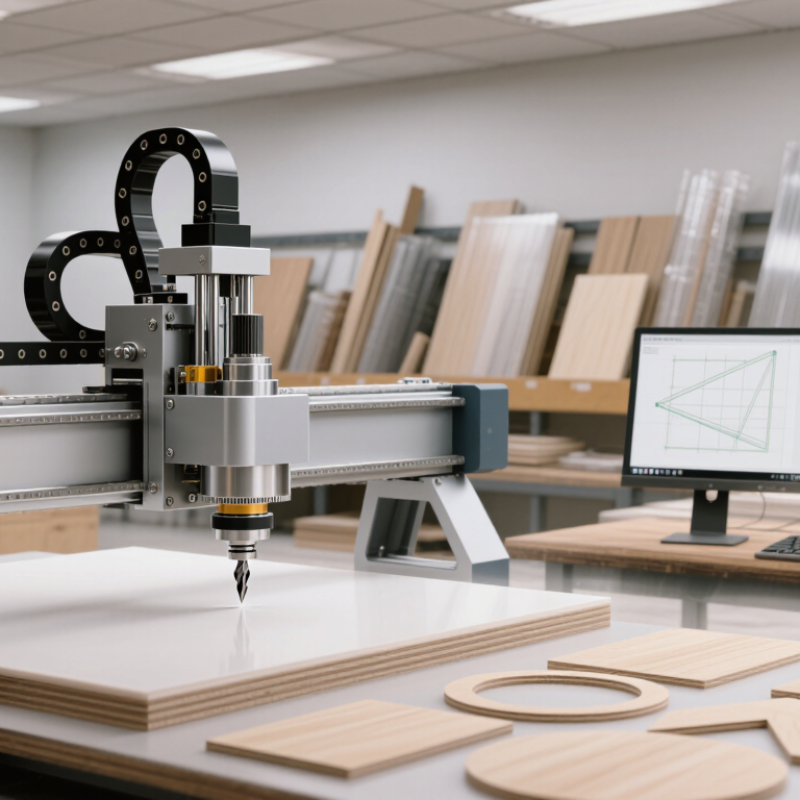
Why Choose a Signmaking CNC Router for Your Business?

What Is a Signmaking CNC Router?

A signmaking CNC router is a computer-controlled cutting machine for producing letters, logos, panels, and dimensional signs. CNC means computer numerical control. A design file guides the router’s movement across a flat work surface. The cutting tool removes material with measured speed and depth.

Most signmaking routers handle materials such as acrylic, PVC sheet, aluminum composite, wood, and certain foams. A spindle rotates the cutter while the machine follows programmed paths. Operators may cut outlines, engrave details, or create raised lettering. The work surface must hold the sheet firmly. Even a small movement can spoil an otherwise accurate sign.

In daily production, the process starts with digital artwork and material testing. Experienced operators check cutter size, cutting depth, feed rate, and dust extraction before running a full sheet. Small test pieces help reveal melting, chipping, or rough edges. They also reduce material waste. The first attempt is rarely perfect. That is normal.

A router can improve repeatability and reduce demanding manual cutting. It may also support custom orders with consistent dimensions. However, it still needs trained supervision, routine maintenance, and safe operating procedures. Tool wear changes results gradually. A neglected cutter can leave fuzzy edges or uneven engraving. Careful measurement matters. Good output depends on both machine capability and practical judgment.

How Does a Signmaking CNC Router Work?

Why Choose a Signmaking CNC Router for Your Business?

How Does a Signmaking CNC Router Work?

A signmaking CNC router converts a digital drawing into a precise cutting path. CAD software creates letters, logos, and panel shapes. CAM software converts that design into G-code. The controller reads each command. Motors move the gantry across the X, Y, and Z axes. Meanwhile, a spindle rotates the cutting bit. It removes material layer by layer. The process looks simple, but setup mistakes remain common.

During production, operators set the spindle speed, feed rate, cutting depth, and tool diameter. A vacuum table keeps the sheet stable. Dust extraction improves visibility and surface quality. The router can process acrylic, PVC, wood, foam, and aluminum composite with suitable tooling. The 2024 Global CNC Machine Market Outlook estimates the sector will grow at over 5% annually through 2028. A professional signage consumer study also reported that 68% of customers connect sign quality with business quality. One wrong zero point can shift an entire panel.

Tips: Test-cut a small corner first. Use a sharp bit. Secure the material firmly. Check the Z-axis before every new sheet. Keep records of successful feeds and speeds. Do not trust default settings blindly. That habit saves material, although it may slow production. Measure finished letters with calipers. A 1 mm error can visibly change spacing. Simulate the toolpath before cutting. This step feels repetitive. It prevents expensive surprises.

Why Choose a Signmaking CNC Router for Your Business? - How Does a Signmaking CNC Router Work?

Business or Process Dimension Typical Data or Operating Range How It Works Business Value for Signmakers
Common Materials Acrylic, PVC foam board, aluminum composite panel, wood, plywood, MDF, and non-ferrous aluminum The cutting tool follows programmed toolpaths to cut, engrave, pocket, or profile sheet materials. One machine can support dimensional letters, shop signs, directional panels, display parts, and engraved plates.
Typical Work Area Approximately 600 × 900 mm to 2,000 × 3,000 mm, depending on machine configuration The table size determines the maximum sheet or sign component that can be processed in one setup. A larger work area reduces repositioning and is useful for large-format signs and sheet nesting.
Spindle Power Commonly about 1.5–6 kW for signmaking applications The spindle rotates a router bit at high speed. Lower power suits plastics and light engraving, while higher power supports heavier cutting. Appropriate spindle power helps balance cutting capability, energy use, tool life, and surface quality.
Spindle Speed Often adjustable up to approximately 18,000–24,000 revolutions per minute The controller adjusts rotational speed to match the tool, material, cutting depth, and feed rate. Adjustable speed helps reduce melting in plastics, improve edge quality, and limit unnecessary tool wear.
Cutting Depth per Pass Commonly about 1–6 mm per pass, depending on material, bit, and machine rigidity Thicker stock is usually processed through multiple passes instead of one deep cut. Multiple-pass machining provides better control over heat, cutting force, edge quality, and tool life.
Positioning Accuracy Many commercial machines specify positioning accuracy in the approximate range of ±0.05–0.10 mm Linear drives, guide rails, motors, and the control system move the cutting head to programmed coordinates. Repeatable positioning supports consistent lettering, aligned graphics, and repeat production work.
Maximum Feed Rate Often approximately 10–30 m/min; practical cutting speed is usually lower The feed rate controls how quickly the tool travels through the material while cutting or engraving. Faster movement can increase throughput, but the correct rate is needed to avoid chipped edges, melting, or tool overload.
Cutting and Engraving Tools Straight bits, upcut bits, downcut bits, V-groove bits, compression bits, and engraving cutters Different cutter geometries remove material in different ways and create specific edge, groove, or engraving profiles. Tool flexibility allows one router to produce flat cuts, beveled letters, grooves, pockets, and fine engraved details.
Design and Control Workflow CAD or sign-design file → CAM toolpath → machine control program → finished part The design is converted into machine instructions containing coordinates, cutting depth, tool selection, feed rate, and spindle speed. Digital production improves repeatability and makes design changes easier to implement than manual cutting.
Workholding Method Vacuum table, T-slot clamps, mechanical fixtures, or a combination of methods The workholding system keeps the sheet or workpiece stable while the cutter applies lateral and downward forces. Secure workholding improves dimensional accuracy and reduces movement-related defects.
Dust and Chip Control Dust shoe connected to an extraction system; a suitable extractor is important for wood and board materials The dust shoe collects chips and particles near the cutter during machining. Effective extraction improves visibility, protects machine components, and supports a cleaner, safer work area.
Production Advantages Repeatable digital cutting, reduced manual layout, rapid design changes, and material nesting Software calculates toolpaths and can arrange multiple parts efficiently on a sheet before machining. Better nesting can reduce material waste, while automation helps maintain consistent output across orders.
Suitable Sign Products Flat panel signs, raised lettering, channel-style components, engraved plaques, templates, and display elements Two-dimensional profiles and three-dimensional relief features are produced by controlling tool movement along multiple axes. Product variety allows a signmaking business to serve commercial, retail, exhibition, interior, and wayfinding projects.
Main Operating Considerations Tool selection, workholding, feed and speed settings, dust extraction, maintenance, and operator training Material type and thickness must be matched with the cutter, spindle speed, feed rate, and cutting depth. Proper setup improves quality, reduces rework, and helps prevent premature wear or damage to tools and machine components.

Note: The stated ranges are typical commercial operating values rather than universal specifications. Actual performance depends on machine construction, tooling, material thickness, workholding, software settings, and operator experience.

Which Materials Can It Cut and Engrave?

A signmaking CNC router becomes valuable when one machine handles varied materials. Acrylic cuts cleanly and produces polished-looking letters, while PVC foam board cuts quickly for lightweight displays. Aluminum composite panels suit rigid outdoor signs, but their thin skins require sharp tooling and controlled feeds. Plywood and MDF support routed logos, templates, and dimensional lettering. Solid hardwood works well too, although grain direction can cause uneven edges.

Material choice also reflects wider industry demand. PlasticsEurope’s Plastics—The Fast Facts 2023 reported global plastics production of 400.3 million tonnes in 2022, showing why acrylic and PVC remain common fabrication materials. The FAO’s Global Forest Products Facts and Figures 2023 reported more than 390 million cubic metres of wood-based panels produced globally in 2022. These figures do not guarantee easy machining. Moisture, density, coatings, and recycled content can change the result. I have found that “one setting fits all” is a costly assumption.

Tips: Use single-flute bits for many plastics, and test scrap material first. Secure thin sheets firmly to prevent vibration. For aluminum, use shallow passes, suitable lubricant, and carbide tooling. Engraving is safer than deep cutting on thin metal. Keep dust extraction active with MDF, and check the supplier’s safety sheet before machining unfamiliar panels. A small test panel can reveal melting, chipping, or poor contrast before a full sign is ruined.

What Business Benefits Does It Provide?

A signmaking CNC router can turn a busy workshop into a more consistent production space. It cuts letters, panels, logos, and mounting holes with repeatable accuracy. That consistency matters when a customer orders ten matching signs. Manual cutting may work for one piece, but errors multiply across larger batches. A router also handles materials such as acrylic, PVC, wood, and aluminum composite panels. The right tooling remains essential. A poor bit can melt plastic, chip edges, or waste an entire sheet.

The clearest business benefit is improved workflow. Operators can prepare files while the machine cuts, reducing idle time between design and finishing. Faster production may help a shop accept urgent orders without immediately adding staff. It can also create cleaner edges, which reduces sanding and rework. Customers notice those details. They notice delays, too. However, the machine does not create profit by itself. Training, dust extraction, maintenance, and accurate calibration require regular investment. Material waste can still occur when designs are poorly nested or settings are guessed. A practical shop should record cutting times, rejected pieces, and maintenance costs for several months. That evidence shows whether the router truly improves margins. It may not suit every business, especially one handling only occasional custom signs. Yet for steady production, reliable repetition can protect quality while giving skilled workers more time for design, finishing, and customer service.

Why Choose a Signmaking CNC Router for Your Business?

A CNC router can improve common sign-production workflows by increasing output while reducing setup time, material waste, and manual labor requirements.

Comparison uses an indexed baseline where the traditional workflow equals 100. Higher output is better; lower setup time, material waste, and manual labor are better.

How Should You Choose the Right CNC Router?

Why Choose a Signmaking CNC Router for Your Business?

How Should You Choose the Right CNC Router?

Choosing a signmaking CNC router starts with your actual production needs. Measure typical board sizes, material thicknesses, and weekly order volumes. A large worktable is useful, but it may waste valuable floor space. Consider cutting areas, spindle power, speed control, and compatible software. A machine should handle acrylic, PVC, wood, aluminum composite, and similar sign materials safely. I once focused too heavily on maximum speed. That choice created more dust and rougher edges than expected.

Look for stable construction, accurate motion systems, and reliable dust extraction. Ask the supplier for sample cuts using your own materials. Check the finished edges, lettering details, noise level, and setup time. Operator training also matters. Clear manuals, responsive technical support, and accessible replacement parts can reduce costly downtime. Review electrical requirements and workplace safety procedures before installation. The cheapest option may become expensive when maintenance is difficult.

Tips: Choose a machine that fits your daily workload, not your biggest imagined order. Test small letters and tight curves before purchasing. Confirm the control system is easy for your team to learn. Keep enough space for material loading and dust collection. Leave room for improvement. Your first estimate may be wrong. That is normal, but record real cutting times and revise your decision carefully.

FAQS

How does a signmaking CNC router work?

CAD software creates the sign design. CAM software converts it into machine instructions called G-code. Motors move the cutting head across three axes. A rotating bit removes material layer by layer.

What materials can a signmaking CNC router cut?

Suitable tooling allows cutting acrylic, PVC, wood, foam, and aluminum composite. Different materials require different speeds, depths, and cutting bits. One bit cannot handle everything well.

What settings must an operator check?

Check spindle speed, feed rate, cutting depth, and tool diameter. Confirm the Z-axis height before every new sheet. Default settings can cause melting, chipping, or poor edges.

How can operators reduce cutting mistakes?

Test-cut a small corner before processing the full sheet. Secure the material firmly and simulate the toolpath. Check the zero point carefully. Mistakes still happen.

What business benefits can this router provide?

It produces repeated letters, panels, logos, and mounting holes with consistent accuracy. Operators can prepare another file while the machine cuts. Cleaner edges may reduce sanding and rework.

Can a CNC router increase business profits automatically?

No machine guarantees profit. Training, maintenance, dust extraction, calibration, and material waste affect margins. Record cutting times, rejected pieces, and maintenance costs for several months. That evidence matters.

How should a business choose the right router size?

Measure common board sizes, material thicknesses, and weekly order volumes. Match the worktable to daily production, not an imagined large order. A larger table may consume unnecessary floor space.

What should buyers test before purchasing?

Ask for sample cuts using your own materials. Test small letters, tight curves, and thicker panels. Examine edge quality, noise, setup time, and dust collection. My first estimate may be wrong.

Why are training and technical support important?

Clear instructions help operators learn the control system faster. Accessible replacement parts can reduce downtime. Support also helps solve calibration and tooling problems. It needs testing.

What workplace details should be planned before installation?

Check electrical requirements, material-loading space, dust collection, and safety procedures. Leave room around the machine for movement and maintenance. Crowded workshops create avoidable problems.

Conclusion

A Signmaking CNC Router is a computer-controlled cutting and engraving machine designed to help businesses create accurate, professional signs and decorative products. It follows digital design instructions to move a rotating cutting tool across the material, producing clean shapes, lettering, grooves, and surface details with consistent results. Depending on the tool and settings, it can process materials such as acrylic, PVC, wood, foam board, composite panels, and certain non-ferrous metals.

For signmaking businesses, this equipment can improve production speed, repeatability, design flexibility, and overall efficiency while reducing manual cutting errors. It can support custom orders, prototypes, dimensional lettering, display panels, and other promotional products. When choosing the right CNC router, businesses should consider the working area, spindle power, machine accuracy, software compatibility, dust collection, safety features, maintenance needs, and available technical support. Selecting a model that matches the materials, product sizes, workload, and future growth plans can help ensure reliable performance and a strong return on investment.

Adrian

Adrian

Adrian is a professional marketing specialist dedicated to helping businesses understand products, markets, and customer needs through clear, practical, and insightful communication. With a strong understanding of the company’s product portfolio, industry applications, and service standards, he......