
Choosing a CNC router for a school workshop requires more than comparing spindle speed and price. A STEM Educational CNC Router should help students connect design, mathematics, engineering, and practical making. It should also feel manageable for teachers who may not have advanced machining experience. In a busy classroom, clear software, guarded moving parts, and reliable emergency controls matter as much as cutting accuracy.
This guide examines seven CNC routers suited to school environments, focusing on usability, safety features, learning value, material compatibility, and long-term support. Each option is considered for realistic classroom tasks, such as engraving plywood, cutting acrylic shapes, or producing small prototype parts. We also consider work area, noise, dust collection, maintenance, and the availability of training resources. These details often decide whether a machine becomes a trusted teaching tool or gathers dust in a corner.
Real classrooms are rarely perfect. Students make mistakes, tools wear out, and projects sometimes take longer than planned. That is part of the learning process, but schools still need dependable equipment and sensible supervision. Our evaluation combines manufacturer specifications with practical workshop expectations and educator-focused considerations. Some machines may appear impressive yet feel complicated for younger learners. Others may offer fewer features but create a calmer, more productive classroom. The best choice depends on age groups, lesson goals, budget, staff confidence, and available space. Reflect carefully before purchasing. A router should support creativity, not become another difficult obstacle.
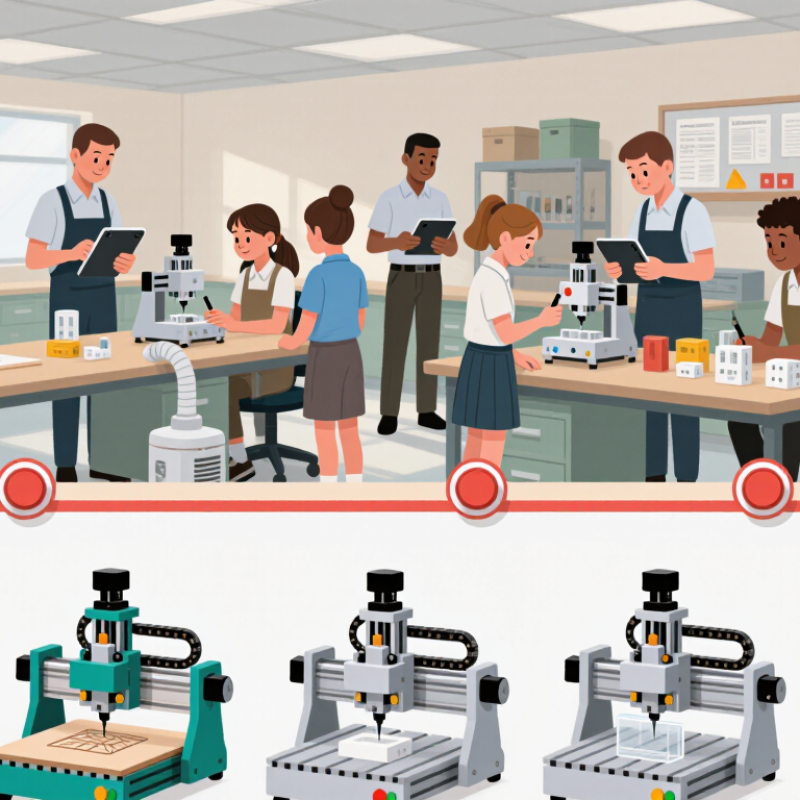
A school-ready CNC router should turn theory into a controlled, observable process. Students can design a simple key holder, preview toolpaths, and measure finished edges. The machine needs an enclosed cutting area, a clearly marked emergency stop, and effective dust extraction. These features protect learners while making classroom supervision realistic. Noise matters too. A loud machine can bury instructions.
Suitable controls should support beginners without hiding the engineering. Visual software, simulation, and adjustable feed rates help students connect code with movement. Teachers also need permission-based access, quick job cancellation, and logs for reviewing mistakes. A compact work area is useful, but it should accept common educational materials such as plywood, foam, and soft plastics. Reliable calibration is essential. A loose belt or inaccurate origin can turn a math lesson into confusion.
Durability affects learning more than polished appearance. Choose a router with replaceable cutting tools, accessible maintenance points, and documentation written for educators. Lesson planning should include setup time, cleanup, ventilation checks, and supervised tool changes. I would not judge suitability by maximum speed alone. Slower, repeatable motion often teaches better measurement habits. Even then, no machine removes human error. Students may misread a drawing, select the wrong tool, or forget to secure stock. Those failures are useful if teachers can pause the process and discuss them safely. A practical trial with one class can reveal problems that specifications miss.
When comparing educational CNC routers, start with the learning task, not advertised horsepower. The World Economic Forum’s Future of Jobs Report 2023 ranks analytical thinking as the leading core skill. Creative thinking ranks fifth. A suitable router should support design, measurement, cutting, and inspection. Students might draw a finger joint, simulate the toolpath, cut plywood, and test the fit. That visible process teaches more than speed alone.
Compare the working area, spindle power, positional accuracy, and software controls. A medium cutting bed suits most classroom projects without wasting valuable space. Look for simple toolpath settings, offline operation, clear file management, and support for common design formats.
UNESCO’s 2023 Global Education Monitoring Report stresses that technology works best with teacher preparation and clear evidence. Complex software can undermine that goal. It happens easily.
Safety deserves equal attention. Check for an emergency stop, enclosed moving parts, dust collection, noise control, and accessible maintenance points. Wood dust should not drift across a classroom. Students also need guarded demonstrations and repeatable operating procedures. The same UNESCO report found that only 16% of countries explicitly guarantee data privacy in education, making local control preferable where possible. A quieter machine may still produce poor learning if its software frustrates beginners. I would also question impressive accuracy claims unless schools can verify them with test cuts, calibration logs, and daily supervision.
7 Best STEM Educational CNC Routers for Schools
Seven Recommended CNC Routers for Classroom Use
A suitable school CNC router should make learning visible, manageable, and safe. The first recommendation is an enclosed desktop router for beginners. Its clear panels help students observe cutting without touching moving parts. A compact three-axis router suits small projects, such as signs, prototype panels, and simple geometric models. A modular router works well when teachers need adjustable work areas. It can grow with the curriculum, although assembly may require patience.
A larger benchtop router supports wood, plastics, and classroom-safe composite sheets. It offers useful space for team projects. A high-precision educational router benefits advanced students learning tolerance, toolpaths, and digital design. A fourth-axis router can introduce curved objects, but it may increase setup time. The seventh option is a mobile router with locking wheels. It saves laboratory space, yet vibration control needs careful checking. Each choice should include guarded moving parts, an emergency stop, reliable software, dust extraction, and accessible replacement components. Low price alone is a weak selection method.
Tips: Begin with soft materials and short cutting sessions. Keep a visible operating checklist nearby. Test every design in simulation mode first. Teachers should demonstrate clamping and tool changes personally. Noise and dust can surprise new users. Student groups may also need more supervision than expected. Review failed cuts openly; they often reveal unclear measurements, loose material, or an unsuitable feed rate.
| Recommended Router Type | Typical Cutting Area | Spindle or Router Power | Suitable Materials | Key Classroom Safety Features | Best Educational Use | Recommended Class Size | Typical Skill Level | Approximate Cost Range | Overall Classroom Value |
|---|---|---|---|---|---|---|---|---|---|
| 1. Compact 3018-Class Desktop CNC Router | Approximately 300 × 180 × 45 mm | 150–300 W DC spindle | Wood, plywood, MDF, acrylic, plastics, and soft non-ferrous materials | Enclosed cutting area recommended; emergency stop; dust collection; eye protection | Introductory CAD/CAM, coordinate systems, engraving, and small relief designs | 1–2 students per machine | Beginner | Approximately US$250–650 | Excellent for entry-level practice |
| 2. Medium 3040-Class Desktop CNC Router | Approximately 300 × 400 × 75 mm | 300–800 W spindle | Wood, MDF, acrylic, plastics, and light aluminum with suitable tooling | Protective enclosure, emergency stop, limit switches, workholding clamps, and dust extraction | Small product prototypes, signage, 2D profiling, and introductory 3D machining | 2–3 students per machine | Beginner to intermediate | Approximately US$700–1,800 | Strong balance of size and capability |
| 3. Enclosed 4030-Class Educational CNC Router | Approximately 400 × 300 × 80 mm | 500–1,500 W spindle | Wood, plastics, acrylic, composites, and limited aluminum work | Full enclosure, interlocked door, emergency stop, limit switches, and integrated dust management | Design engineering, prototype fabrication, CAM toolpath testing, and project-based learning | 2–4 students per machine | Intermediate | Approximately US$1,500–3,500 | Very good for supervised school workshops |
| 4. Bench-Top 6040-Class CNC Router | Approximately 600 × 400 × 100 mm | 800–1,500 W spindle | Wood, plywood, MDF, plastics, acrylic, foam, and light aluminum | Rigid enclosure preferred; emergency stop, limit switches, dust extraction, and secure workholding | Larger signs, mechanical parts, assemblies, scale models, and advanced fabrication | 3–5 students per machine | Intermediate | Approximately US$2,000–5,000 | High versatility for STEM projects |
| 5. Full-Size 6090-Class CNC Router | Approximately 600 × 900 × 100 mm | 1.5–2.2 kW air- or water-cooled spindle | Wood, sheet plastics, foam, composites, and some aluminum applications | Enclosed or guarded cutting zone, emergency stop, overload protection, dust extraction, and operator training | Large-format design projects, furniture components, architectural models, and capstone work | 4–6 students per machine | Intermediate to advanced | Approximately US$4,000–9,000 | Excellent for advanced fabrication programs |
| 6. Heavy-Duty 1212-Class Educational CNC Router | Approximately 1,200 × 1,200 × 150 mm | 2.2–3.0 kW spindle | Solid wood, plywood, MDF, plastics, foam, composites, and selected non-ferrous materials | Full guarding, emergency stop, lockable controls, dust extraction, automatic lubrication, and trained supervision | Large prototypes, construction technology, furniture design, and school manufacturing projects | 5–8 students per machine | Advanced | Approximately US$8,000–18,000 | Best for dedicated technical workshops |
| 7. Modular CNC Router with Automatic Tool Changing | Approximately 600 × 900 mm to 1,300 × 2,500 mm | 2.2–6.0 kW spindle with automatic tool changer | Wood, plywood, MDF, plastics, foam, composites, and production-grade sheet materials | Fully enclosed work zone, door interlock, emergency stop, tool-length measurement, dust extraction, and formal operator training | Advanced CAD/CAM, multi-tool workflows, repeatable production, robotics integration, and vocational training | 6–10 students per machine | Advanced to vocational | Approximately US$15,000–40,000+ | Best for high-capacity STEM and career programs |
A strong school CNC router should make safety visible, not merely mention it. Look for an enclosed cutting area, a reachable emergency stop, stable clamps, and reliable dust collection. Students should wear eye protection and secure loose clothing before operation. An instructor must inspect the bit, material, and workholding setup each time. A quiet machine is helpful, but quiet does not mean harmless. Even a small router can eject chips or damage a workpiece.
Software matters as much as hardware. Choose student-friendly CAD and CAM tools with simulation, toolpath previews, and clear error messages. Students need to see cutting boundaries before pressing start. Offline practice can teach coordinates without wasting material. The software should also support separate student accounts and controlled file access. Cloud features are convenient, yet schools should review privacy settings carefully. A printed setup checklist still helps when networks fail.
Skill requirements should grow with the machine. Beginners can measure wood, set an origin, and identify the X, Y, and Z axes. Older students can adjust feed rates, spindle speed, and cutting depth under supervision. Teachers need training in maintenance, emergency procedures, and basic troubleshooting. Schools sometimes focus on purchase price and underestimate replacement bits, ventilation, and training time. That mistake is understandable, but expensive. A router can support impressive projects, though rushed lessons may reward button pressing instead of careful thinking. Students should explain why a toolpath is safe before running it.
Choosing among seven educational CNC routers requires more than comparing spindle speed. Start with your learners, projects, and room. A compact three-axis router suits plywood, foam, and beginner projects. A larger bed supports furniture-scale work but demands stronger extraction, supervision, and floor space. Check the controller, emergency stop, enclosure, software access, and replacement-part availability. A machine that teachers cannot repair quickly may become an expensive table.
The World Economic Forum’s Future of Jobs Report 2023 states that 44% of workers’ core skills may change by 2027. It also reports that six in ten workers will need training before then. This supports choosing equipment that teaches transferable skills, including CAD planning, measurement, toolpath logic, and safe troubleshooting. Look for adjustable feeds, clear manuals, and offline practice software. Cutting speed is not the best learning outcome. It can even distract from accuracy.
Tips: Ask students to design a small nameplate before approving a larger router. Measure noise, dust, and walking space during a real class. Review the Safety Data Sheet for every cutting material. Require teacher training and documented operating procedures. A low purchase price may appear efficient, but that judgment can age badly. I would also test the interface with a novice teacher, not only an experienced technician. If setup takes thirty minutes, lessons may quietly become demonstrations instead of hands-on learning.
It should make design, toolpaths, cutting, and measurement visible. Students can create a small key holder and inspect its edges. Safety matters.
Choose an enclosed cutting area, a marked emergency stop, and effective dust extraction. Teachers need quick cancellation and supervised tool changes. Noise matters too.
It should accept plywood, foam, and soft plastics. These materials support beginner projects without demanding a large workshop. Always check each material’s safety information.
A loose belt or incorrect origin can spoil a measurement lesson. Students may blame mathematics for machine error. Calibration needs regular checking.
Not necessarily. Slower, repeatable motion often teaches measurement better. Fast cutting looks impressive, but accuracy is the real lesson.
Visual software, simulation, adjustable feed rates, and offline practice reduce confusion. Students should still see how code controls movement. Do not hide the engineering.
Match the work area to planned projects and available floor space. A compact three-axis router suits small projects. Larger beds require stronger extraction and supervision.
Run a real class trial with a novice teacher. Measure noise, dust, walking space, setup time, and cleanup. Specifications can miss classroom problems.
Replaceable tools, accessible maintenance points, and clear educator manuals reduce downtime. A machine teachers cannot repair quickly may become an expensive table.
Students may misread drawings, choose unsuitable tools, or forget to secure material. Teachers can pause safely and discuss the cause. Errors teach, sometimes awkwardly.
Choosing the right STEM Educational CNC Router can make hands-on learning safer, more practical, and more engaging for students. A suitable classroom router should have a compact design, enclosed or guarded cutting areas, emergency-stop controls, adjustable speed settings, and beginner-friendly operation. Important features to compare include working size, material compatibility, precision, noise level, maintenance needs, software support, and compatibility with school computers. This overview presents seven recommended router categories for different classroom situations, including entry-level desktop units, enclosed safety models, compact training machines, advanced project routers, collaborative lab systems, portable units, and larger machines for technical programs.
Safety, software, and student skill levels should guide every purchasing decision. Schools should provide clear training, protective procedures, teacher supervision, and age-appropriate project materials. Easy-to-use design software, simulation tools, and reliable instructional resources can help students understand digital fabrication before operating the machine. Ultimately, the best choice depends on classroom space, budget, curriculum goals, maintenance support, and the complexity of projects students are expected to complete.